Why Different Schulte Table Modes Need Separate Results
Standard numbers, reverse order, letters, red-black rules, and alternating number-letter grids are different browser tasks. Learn why their times and mistakes should stay in separate comparison groups.
By schulte-table.org editorial team ·
A 5×5 standard-number time should not be treated as the same raw-time result as a reverse, letter, red-black, or number-letter round. These tools change the target type, sequence, number of available targets, hints, pauses, or switching rule. The timer may display seconds in each case, but the seconds belong to different tasks.
Separate does not mean that one mode has a higher human rank. A particular user may find one rule less familiar or more cumbersome. That personal experience is not a validated difficulty ladder.
1. Standard and reverse numbers use different direction rules
The standard numbered grid displays the integers 1 through gridSize squared and expects 1 → 2 → 3 until the largest value. The site's fixed speed test uses 5×5, while standard size pages cover 3×3 through 10×10. An incorrect number does not advance the expected target.
The Reverse tool also supports 3×3 through 10×10, but descending mode builds the explicit numeric list from the largest value down to 1. It is not reversing a random cell layout; it reverses the numeric target direction. The tool also offers ascending mode, and its personal best and recent-ten average are grouped by direction and grid size.
Reverse can pause, auto-pauses when the page is hidden, offers a next-target hint, and saves only when the user explicitly saves a completed round. Those controls differ from the standard speed-test workflow, adding further reasons to keep their series labeled.
2. Letter mode changes the target set and display
Letter mode follows alphabetical order beginning at A. It supports grid selectors from 3×3 through 6×6, but caps the target list at 26 Latin letters. A 6×6 selection therefore still generates 26 letter buttons rather than 36 targets.
Uppercase displays A, B, C; lowercase displays a, b, c; mixed case alternates the display by sequence position, such as A, b, C, d. The underlying alphabetical order does not change with case. Hint visibility, case, and size are part of the configuration, so even two letter results may need separate labels.
3. Red-black mode combines color and numeric direction
The current red-black tool supports size selectors 4, 5, and 6. It creates two color sets of floor(gridSize squared ÷ 2): red values ascend from 1, while black values are followed in descending order. At the 5×5 setting this means 12 red plus 12 black targets, not the 25-target standard-number sequence.
Alternating mode follows red 1 → black highest → red 2 → black next-highest. Red-first mode completes all red ascending values before the black descending values. The current Guided target choice uses the same alternating token order; the interface shows the next target in every mode, and the feedback option can ring the correct cell. Mistakes are split into color and sequence counts in addition to the total.
These concrete rules are enough to reject a shared raw-time baseline with standard numbers. They are not enough to claim that red-black is universally harder or intended for a higher category of person.
4. Number-letter mode alternates token types
The number-letter tool supports 3×3 through 6×6 and fills the selected cell count with alternating tokens. With number first and ascending direction, the sequence begins 1 → A → 2 → B. With letter first it begins A → 1 → B → 2. Letter case changes display, not token order.
Reverse direction reverses the complete generated token sequence. It does not independently count numbers down while letters count up. For example, reversing a number-first sequence begins at that sequence's last token and walks backward through both token types. Timer on/off, start type, direction, case, and highlighting are stored in its configuration key.
5. Mode comparison table from the current implementation
The table describes task rules, not a difficulty order. “No” means start a separately labeled result group.
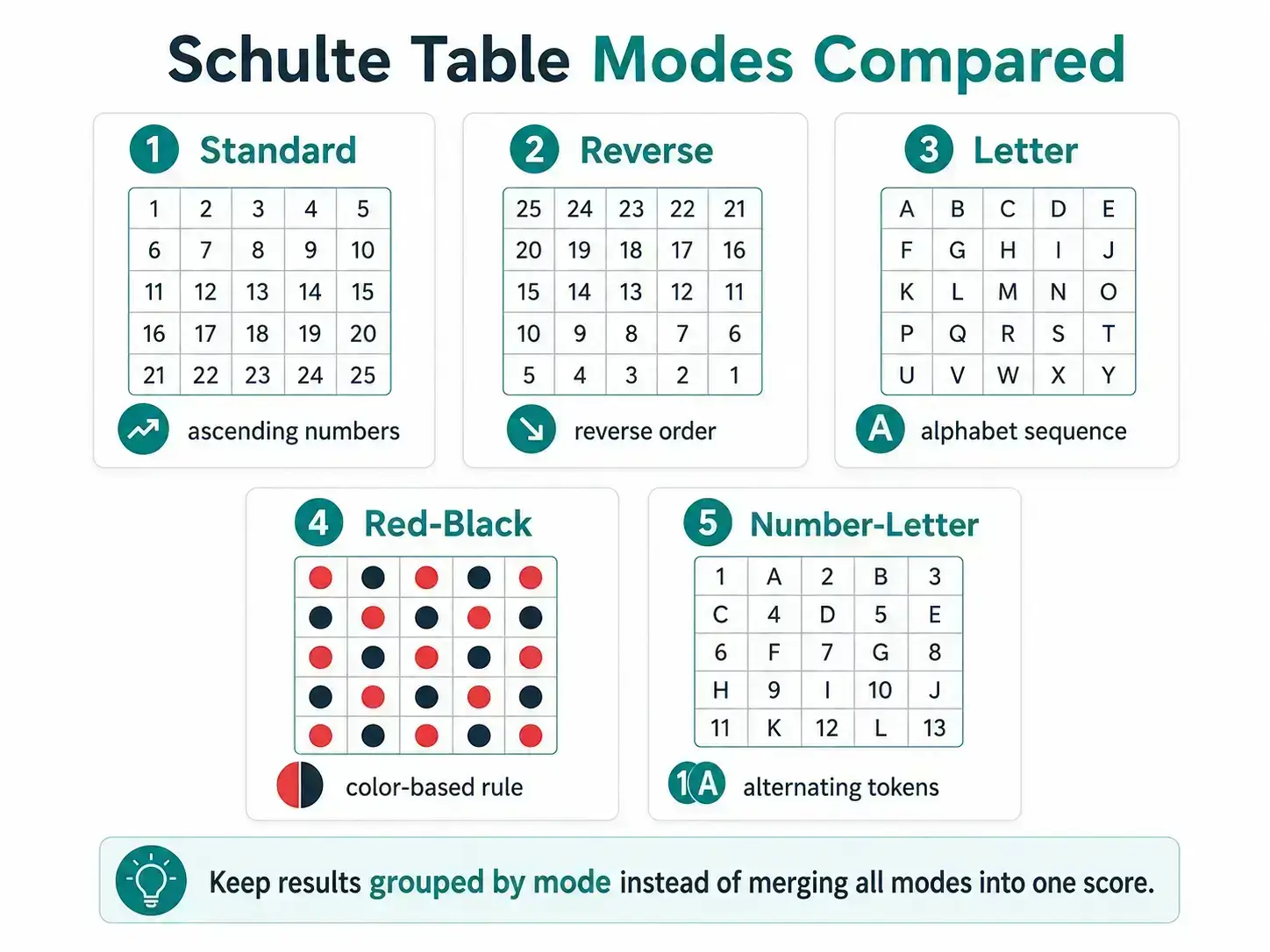
The mode overview illustration summarizes target families and sequence direction. Its mini-grids are not exact screenshots or shuffled production layouts; the table below states the implemented rules.
| Mode | Target type | Sequence rule | Extra rule | Share standard-number baseline? |
|---|---|---|---|---|
| Standard | Numbers 1 to size² | Ascending | No token switching | Yes, only when other settings also match |
| Reverse | Numbers 1 to size² | Descending largest to 1 (or separately selected ascending) | Pause, hint, direction-specific history | No |
| Letter | Up to 26 Latin letters | Alphabetical A onward | Upper/lower/mixed display and hint | No |
| Red-black | Color plus numbers | Red ascending; black descending | Alternating, red-first, or guided-target setting | No |
| Number-letter | Numbers plus letters | Alternating; number-first or letter-first | Complete-sequence reverse, case, timer, highlight | No |
6. Visual-scanning tools add still more task labels
The site's visual-scanning route is /visual-scanning-exercises. Its ordered, changing-target, symbol, and alternating options are stored under distinct mode values such as visual-ordered, visual-random-target, visual-symbol, and visual-alternating. Those records should not be folded into a standard-number group simply because the same Tracker can display them.
Target identity and completion logic differ across those drills. Their presence illustrates why a broad label such as “Schulte time” is too vague for a data row; the mode is part of the result.
7. How local histories and Tracker fields divide results
The unified attempt schema uses the exact fields gridSize, mode, and optional inputMethod, along with durationMs, mistakes, completed, timestamps, and identifiers. The Tracker's mode and grid-size filters are therefore essential before reading best, median, average, or CV. Number-letter records also use challengeId to retain a configuration key when explicitly saved.
Not every tool writes to the unified store in the same way. Reverse and number-letter provide explicit Save to Tracker actions. The score calculator also saves only after a button press. Letter and red-black currently maintain their own browser histories; the Tracker can perform a one-time migration of known legacy histories, but later rounds are not automatically a synchronized cross-tool dataset. Standard speed-test history uses its own local key.
Treat missing records as a storage-workflow fact, not as a zero. Exported Tracker data describes only records present under its versioned local schema in that browser.
8. What separate mode results do—and do not—mean
Separate groups let you compare like with like: standard 5×5 mouse rounds with standard 5×5 mouse rounds, or number-letter rounds with the same start type, direction, case, and timer choice. They prevent a rule change from masquerading as a time change.
They do not create a difficulty ranking, medical finding, attention diagnosis, intelligence score, population position, or promised transfer to reading and study. Each result remains a record of the specified browser task and setup.