
Classic numbers

Select numbers in ascending order. This small 3×3 example uses 1–9; the linked standard tool starts at 5×5 with 1–25.
Best uses matching mode, size, timing, input, display, and replay type after your first selection establishes the input. Games counts completed rounds in this mode and size in this browser. Errors count without a time penalty. Changing size abandons an unfinished round without saving it.
Your completed rounds will appear here.
View progressEarlier records with incomplete measurement details remain in Progress Tracker.
Start opens a three-second countdown. A new random grid shuffles after preparation. Timing starts on your first correct selection of 1 and stops at the final number. Earlier mistakes still count. The displayed timer and saved result use this same interval. There is no pause: time in another tab or on a locked screen remains included after timing starts. Leaving an unfinished round does not save a completion.
Retry same grid preserves the last arrangement and resets time and mistakes. Memorized-layout attempts form a separate comparison group. New random grid reshuffles; it can rarely repeat a layout. Completed rounds save time, mistakes, input, and comparison settings to the shared Progress Tracker. Older records remain available, but missing measurement details exclude them from strict personal bests.
Hiding the timer changes only its display; measurement continues. Sound is optional and starts after interaction. Contrast and larger cells change appearance, not the sequence. Changing display during a round excludes it from strict comparison. Preferences stay in this browser when storage is available.
Practice visual search and number sequencing with a free Schulte Table online. Start with the classic 5×5 grid, choose from eight grid sizes, and track your completion time and mistakes at your own pace.
A Schulte Table is a shuffled number grid used for an ordered visual-search task. The classic 5×5 Schulte Table has five rows, five columns, and 25 targets, each appearing once. Look for 1, then 2, and continue through 25. The position changes with a new random round, while the sequence stays the same.
The online game records one round’s completion time and mistakes. Those describe this task under your current conditions; they are not measurements of attention, intelligence, or eyesight. The illustration highlights 1, 2, and 3 to explain the order; it does not reproduce the game’s selection colors.

Use the controls above for a real round. These three panels use the same illustrative layout so you can follow the workflow without confusing a changed position with a changed rule.

Press Start and wait through 3, 2, 1. The board then shuffles; selecting the first correct target begins timing, as explained below.
Select 1, 2, 3, and continue to 25. Check Next when you lose your place. Highlights here illustrate the sequence, not the real interface.
Read time and mistakes together. Choose the same layout for a retry or a new random grid for a fresh search; keep the two types separate.
Return to the playable gridRead the full playing guideCheck the timing rules
Choose for screen space and sequence length. All eight sizes use the same ascending rule, but each extra row and column adds search locations. On a phone, start with a grid whose numbers and controls remain comfortable to select. Larger layouts can scroll inside the board; there is no need to squeeze every cell onto a narrow screen. Changing size leaves an unfinished round.
Choose a rule before comparing results. The following illustrations explain different tasks, rather than eight views of one scoring system. Keep times from different modes separate; a shared grid shape does not make their target sequences or timing protocols equivalent.
Select numbers in ascending order. This small 3×3 example uses 1–9; the linked standard tool starts at 5×5 with 1–25.

Start at the largest number and work down to 1. The 3×3 illustration follows 9, 8, 7…1; the direction changes, not the cell count.

Follow alphabet order: A–I in this 3×3 example, A–Y at 5×5. The six-column layout has at most 26 letters; case does not change the order.

Alternate target types. This numbers-first 3×3 sequence is 1, A, 2, B, 3, C, 4, D, 5. Reverse order reverses the complete sequence.

In 4×4 alternating mode, choose red 1, black 8, red 2, black 7, through red 8, black 1. Red ascends while black descends; both color and number matter.

Match five requested colors in order using any matching cell among 25. Wrong colors are ignored. Timing begins when the new board appears, unlike classic numbers; this task requires color discrimination.

Find 100 two-digit targets from 00 to 99, preserving leading zeros. This miniature is an overview, not a playable board; open the tool for readable cells and controls.

Choose ordered numbers, random targets, symbol matching, or alternating search. The star is a teaching illustration, not a screenshot; symbols vary with the actual mode and settings.
Each selection asks you to hold the next target in mind, scan the available locations, and choose the matching number. A deliberate search can be easier to review than hurried tapping. Let your eyes move comfortably; there is no requirement to fix your gaze at the center or avoid normal eye movements. Focus mode gives the board more space without forcing full screen. Settings offer larger cells, high contrast, and a hidden timer display; hiding the display does not stop the clock.
Explore all tools, including the trainer and center-reference tasks.
In this classic number game, Start begins a three-second preparation countdown. A fresh random layout appears after it. Preparation and the search for 1 are excluded: the first correct selection of 1 starts the clock, and the last correct target stops it. The diagram shows a 5×5 round ending at 25; the timeline is not to scale.
A wrong available target counts as a mistake even before you select 1. Mistakes add no penalty seconds. There is no pause, and time spent in another tab after timing starts remains in the total. Retry same grid preserves the layout; New random gives a new arrangement. These are different comparison groups. Keep size, input method, display settings, and timing protocol consistent when reviewing repeated rounds.
Interpret a time and mistake countCalculate an average of matching roundsTry the fixed 5×5 speed test

Read a series together with its mistakes and conditions. The example below contains six made-up times, including a slower fourth attempt: it illustrates variation, not a promise of improvement. If this browser has eligible classic 5×5 records, the panel instead summarizes the most recent strictly comparable group. Missing measurement facts or unknown mistakes cannot qualify as clean comparable rounds.
Records stay in this browser’s local storage. Clearing site data or switching browsers can remove or separate them. Use the tracker to inspect groups, export a backup, or delete records. This preview reads existing records and does not import older data or change your history.

Left to right: Best / Average / Attempts. Times: 45, 39, 34, 37, 35, 31 s. Best: 31 s; average: 221 ÷ 6 ≈ 36.8 s; attempts: 6.
Choose a workflow that fits the task you want to repeat. These tools provide a date-specific grid, a session structure, or an editable plan. They do not prescribe a practice frequency or guarantee a health or performance outcome.

Return to a reproducible grid seeded by your device’s local date, size, and direction. The calendar is illustrative, not your streak or proof of a verified result.

Choose a 3-, 5-, or 10-minute flow with warm-up and rests. The 5:00 illustration is an example setting, not a running timer or a required daily duration.

Build an optional checklist of activities for future visits. Adjust the tasks to your available time, and use the tracker separately when you want to review completed results.
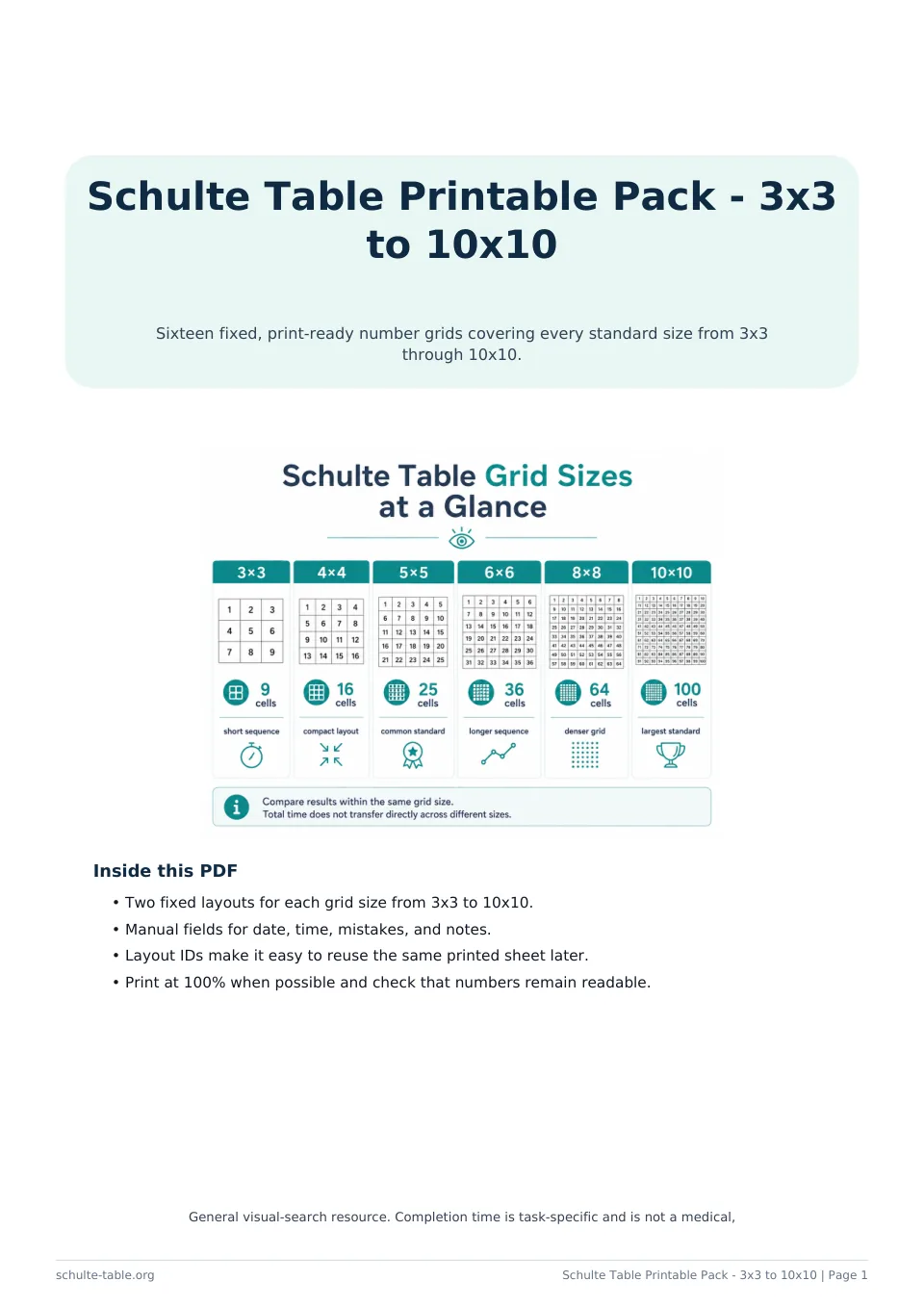
For paper practice, choose the output you actually need. The fixed English PDF pack has 17 pages including the cover and 16 numbered layouts: two for each size from 3×3 to 10×10. The image is the actual pack preview. A downloaded file keeps the same layouts each time, and paper results need to be recorded manually.
Browser printing creates a fresh printable grid instead. For several learners, the teacher workspace can generate batches and matching references. Choose these workflows for their layout and recording needs; printed sheets do not automatically synchronize with the online timer or local history.
Get the fixed English PDF packCreate a fresh printable gridGenerate classroom batchesBrowse all printable resources
Some people use a short number-search task before reading. That is a way to organize a warm-up, not evidence that faster grid times transfer to reading speed or comprehension. Reading involves language and understanding beyond selecting numbered cells. Keep any reading observations separate from Schulte Table results.
A Schulte Table is a shuffled grid for finding targets in a set order. The classic 5×5 format has five rows and five columns, with each number from 1 to 25 appearing once. You select the numbers in ascending order.
Press Start, wait for the three-second preparation countdown, then select 1, 2, 3, and continue through 25 in the classic 5×5 game. If you lose your place, check Next above the board. After the last correct selection, review your completion time and mistakes together.
Yes. This Schulte Table runs free in a browser on a phone, tablet, or computer, with no account or app installation required. Choose a grid whose numbers are readable and cells are comfortable to tap; Focus mode gives the game more screen space.
Try 3×3 or 4×4 for a shorter sequence while learning the controls, or use 5×5 for the classic 25-target format. Choose for readable numbers, comfortable input, and the task length you want. Larger grids through 10×10 add search locations and may need scrolling; size is not an ability grade.
In the classic number game, timing starts at your first correct selection of 1 after the three-second countdown, and stops at the last correct target. Until you select 1 correctly, the timer stays at 0: preparation and the search for 1 are excluded. Hiding the timer display does not stop timing, and switching tabs does not pause it. Other modes can use different rules.
No. In the classic game, selecting a wrong available number adds one mistake without advancing the target or adding penalty seconds. Wrong selections count even before the first correct selection of 1. Continue with the requested number and review mistakes alongside elapsed time.
There is no single pass time that applies to everyone, every device, and every timing method. Keep the 5×5 size, input method, and display settings consistent, then compare your own rounds together with their mistakes. Keep new random layouts separate from same-grid retries. Interpret your time and mistakes, or calculate an average of matching rounds, to choose a personal reference rather than a universal cutoff.
Retry same grid keeps the number positions and resets time and mistakes. New random grid reshuffles the positions for a fresh search. Remembering a layout changes the task, so these attempts form separate comparison groups. Use the same replay type when comparing your times.
When browser storage is available, completed classic rounds are saved locally and normally remain after you close the page. Clearing site data or changing browsers or devices can remove or separate those records; there is no account or cloud sync. Use the progress tracker to review, export a backup, or delete your records. Blocked storage still allows play, but results may not be saved.
Yes. Download the fixed English PDF pack, create a fresh printable grid in your browser, or use the teacher workspace for batches. The PDF keeps the same layouts on each download, while browser printing creates a new layout. Paper timing and mistakes are recorded manually and stay separate from online rounds.